
Quantitative Reasoning·Lesson 4.1·4 min read
Introduction
Overview
Quantitative Reasoning isn't a maths exam. It's a data extraction and calculation speed test. You get a data source - a table, chart, or passage of text - and four questions that need basic arithmetic to answer. Nothing beyond GCSE level.
You don't need advanced formulas or algebra. You need to find the right numbers, pick the right operation, and execute fast.
Format: 9 sets of 4 questions = 36 questions in 26 minutes (including 2 minutes of instruction time). That's roughly 43 seconds per question, or about 2 minutes 53 seconds per set. Every set shares one data stimulus - all 4 questions refer to the same table, chart, or text.
You always have an on-screen calculator. Use it.
The Formula: Recognise, Apply, Triage
Here's every topic area you'll face, the key technique for each, and when to skip. This is the formula - recognise, apply, triage.
| Topic | Key technique | Triage |
|---|---|---|
| Calculator Mastery | Keyboard shortcuts + memory functions | Foundation - not a question type |
| Percentages | The Joyel Shortcut (Final / Initial − 1) | Always attempt (15-30s) |
| Ratios & Rates | The Delta Shortcut + Speed Triangle | Always attempt (15-30s) |
| Data Read (no calculation) | Question First - extract only what you need | Always attempt (10-15s) |
| Averages & Statistics | Delta Method (Change in Sum / n) | Attempt if on pace |
| Money, Tax & Conversions | Bracket-by-bracket + chain fractions | Attempt if on pace |
| Geometry | Decompose into basic shapes | Skip if behind |
| Complex Multi-Step | Label sub-results, use memory + whiteboard | Skip if behind (35-50s) |
Percentages, data reading, and ratios account for the vast majority of QR questions. Master these first and you can answer roughly 70% of questions confidently.
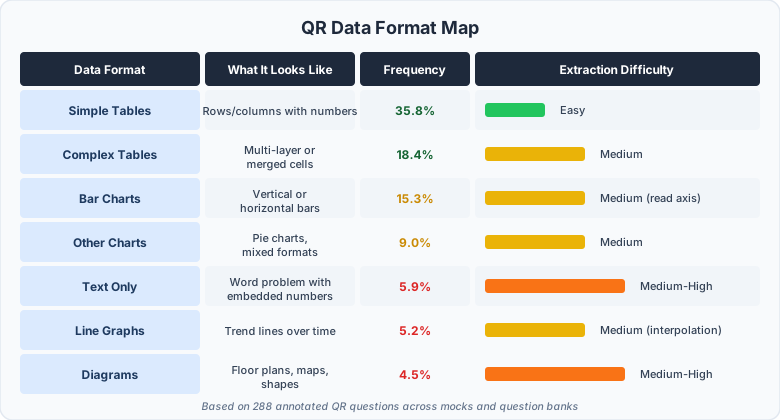
The Data Formats
Every QR exhibit falls into one of these categories. The maths is the same regardless - what changes is how you pull the numbers out.
Question First, Data Second
Most students look at the exhibit, try to absorb all the data, then read the question. That wastes 10-20 seconds per question on information you'll never use.
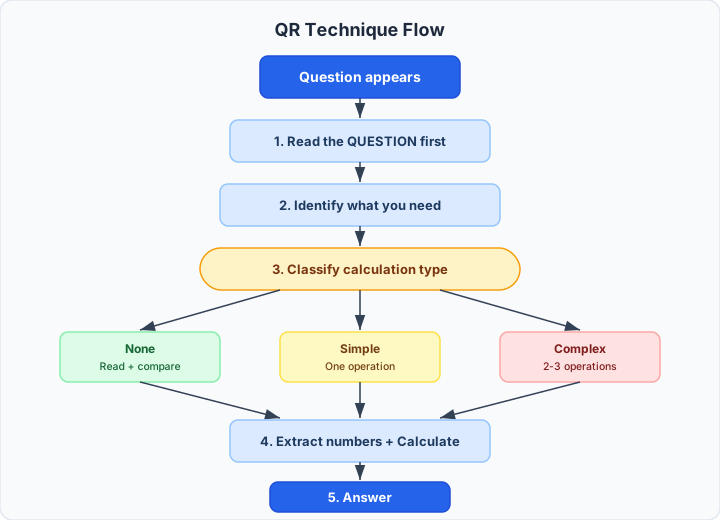
| Step | Wrong order (50-60 sec) | Right order (30-40 sec) |
|---|---|---|
| 1 | Look at exhibit | Read the question |
| 2 | Try to understand all data | Identify what you need |
| 3 | Read the question | Extract only those numbers |
| 4 | Go back to find numbers | Calculate |
| 5 | Calculate | Answer |
The question tells you which 2-3 numbers matter. The other 20 numbers in the exhibit are noise.
Maths Skills by Frequency
Not all maths is equally likely. Focus on what shows up most.
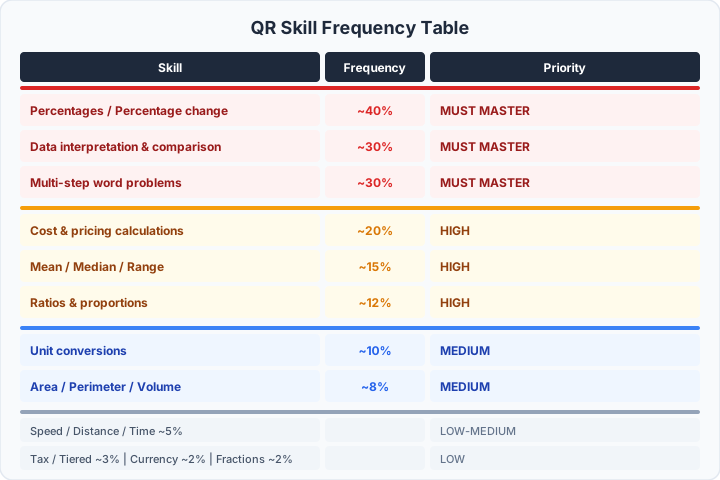
Percentages, data reading, and multi-step problems account for the vast majority of QR questions. Master these three and you can answer roughly 70% of questions confidently.
How Much Maths Does This Actually Need?
Before calculating anything, classify the question:
| Type | Frequency | What's needed | Time |
|---|---|---|---|
| No calculation | ~10% | Read the data, compare, answer | 10-15 sec |
| Simple calculation | ~50% | One operation: +, −, ×, ÷ | 20-30 sec |
| Complex calculation | ~40% | 2-3 operations chained together | 30-45 sec |
This tells you how much time to invest before you start working. If you've classified a question as "no calculation" and find yourself doing long division, something's gone wrong - re-read the question.
The Skip Rule
QR has the tightest time pressure in the UCAT. You need to skip strategically.
Skip if any of these are true:
- You read the question and can't identify the approach in 5 seconds
- The data source is overwhelming (huge table, unclear diagram)
- The question requires 3+ calculation steps
- Answer choices are very close together (needs high precision)
How to skip:
- 1.Eliminate any obviously wrong answers
- 2.Pick from the remaining options
- 3.Flag the question
- 4.Move on - spend no more than 5-10 seconds total
There's no negative marking. A guessed answer with one option eliminated gives you 25-33% odds. A blank answer gives you 0%.
What You'll Learn in This Module
| Lesson | You will learn to... |
|---|---|
| 4.2 Calculator Mastery | Use the on-screen calculator at maximum speed with keyboard shortcuts |
| 4.3 Percentages | Handle percentage calculations, percentage change, and reverse percentages |
| 4.4 Ratios & Rates | Solve ratio problems and speed/distance/time questions |
| 4.5 Averages & Statistics | Calculate mean, median, range with time-saving shortcuts |
| 4.6 Geometry | Handle area, perimeter, volume by decomposing shapes |
| 4.7 Money, Tax & Conversions | Work through tax brackets, currency, and unit conversions |
| 4.8 Complex Problems | Break multi-step problems into manageable sub-calculations |
| 4.9 Triage & Technique Map | Apply the complete QR system with skip rules and time management |
The Mindset Shift
Most students approach QR like a school maths exam - read carefully, show working, check answers. That's too slow for 43 seconds per question.
The QR mindset:
- You're a number hunter, not a mathematician
- You read the question first, not the data
- You extract the minimum data needed, not everything available
- You calculate once and move on - don't re-check
- You skip without guilt - 30 correct answers beat 36 panicked ones